
Troubleshooting
Troubleshooting SharePoint AlertsA common theme running through the SharePoint newsgroups is the frustration of troubleshooting SharePoint Alerts such as when they stop working altogether or work intermittently. I am trying to organise a comprehensive step-by-step troubleshooting guide that should help solve the most common problems. Its a work in progress so if you know of anything that should be added then let me know by adding a comment. Please Note – this guide is for the Out of the Box (OOTB) alerts in SharePoint, not Pentalogic’s Reminder software (though some parts apply to both). Contact us directly for support for Reminder. 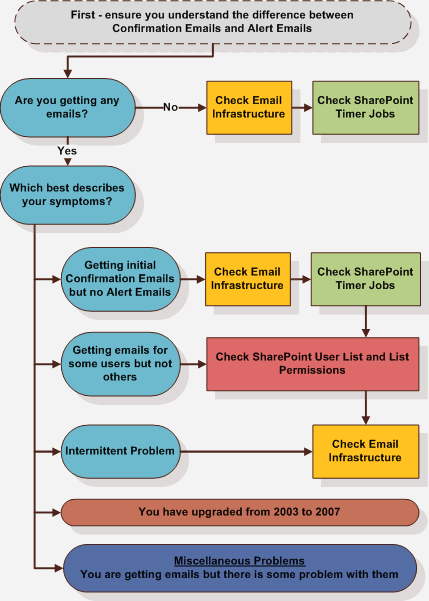 Troubleshooting Flowchart Flowchart in text form The first step is to ensure you understand the difference between Confirmation Emails and Alert Emails. Are you getting any emails?
Which best describes your symptoms?
Further Reading |
|


Hi,
My name is Dorit and I have a problem with SharePoint alters. I work with SharePoint 2007. I get a daily mail of changed items but for some reason each changed item appears twice in the email (duplicated within the email). Does anyone have a solution for this? Thanks
We just got sharepoint at my organization. Every alert I get shows all the information that had been edited out, so we get the new update and the old information in a slightly lighter colour with strikeout font.
Dorit,
I guess you must have enabled Alert Me twice for your SharePoint List/Lib. Please follow the below steps to remove duplicate Alerts:
1. In the Calendar – Go to Actions -> Alert Me
2. Then at the left side click on the link ‘View my existing alerts on this site.’
3. Select all the unwanted Alerts and click Delete Selected Alerts
Hope this helps!!!
Thanks,
Shaf
The above Information is very useful. But what could cause the below behavior for one particular site collection in share point . Alerts are working fine for other site collections in the same server farm.
The previous instance of the timer job ‘Immediate Alerts’, id ‘{D1F15740-4A56-4681-8C12-1DFBF346323B}’ for service ‘{D12E5BA0-2EB5-4CDD-A839-B1BD0CA7117B}’ is still running, so the current instance will be skipped. Consider increasing the interval between jobs.
You should put in an article about alerts on lists with content approval turned on.
It’s not obvious that alerts are only sent to contributors when the items is approved (i.e. not in draft and not pending)
In my case issue for not working alerts was in the timer.
It was enough to stop and start again the Windows SharePoint Services Timer.
Hope this helps.
I have Out-Going email setup and working.
i.e … when a new user is given permissions on a site, the email is delivered.
An example of what does not work: selecting to send an email to a user from a People and Groups list. I get this error message: “Could not perform this operation because the default mail client is not properly installed.”
I do not have Office 2010 installed on this server…is this the problem?
Thanks ahead,
PegH.
This is nothing to do with SharePoint as such. When you do that all it is is a mailto link – just like any web page can do – that opens up your computers default email client to actually send the email. It isn’t sent in the same way that normal emails are sent from. If your doing this from a server thats why it doesn’t work.
http://www.w3schools.com/html/tryit.asp?filename=tryhtml_mailto
Thanks! Found another article addressing the issue: SharePoint Alert Notifications Not Working – Checklist for Troubleshooting
http://www.sharepointdiary.com/2012/02/sharepoint-alerts-not-working-troubleshooting-checklist.html#ixzz2aSeccWhe
hi, I’m using out of the box Alerts on SharePoint 2010 and Windows 7. Some Alerts include the new Item ID from the SharePoint List, and some Alerts include information from a different column in my list, but not the ID number. I need all Alerts to include the ID given by SharePoint to each item entered. How can I make sure I always receive the ID on every Alert? See examples below:
Ex. 1 – Telecom has been added Ex. 2 – Item ID3073 has been added
CAn someone please help me with this: I have a blog and set alerts for the Posts list. People set their alerts for this “Posts” list as well. They all receive confirmation they are subscribed to this alert, but when someone create new post no one receive notification. This blog is under Variation in the form of root/EN/company/…. I have the same blog directly under root/blog and it works as it should – sending alerts. What could be the problem ?