
Troubleshooting – Email when ownership is assigned and Read Access : Only their own
This is one article in the larger Troubleshooting SharePoint Alerts guide
Problem
Task, Project Task and Issues lists have a “Send e-mail when ownership is assigned” feature.
When you use Item-level Permissions and set Read Access to Only their own these emails no longer work.
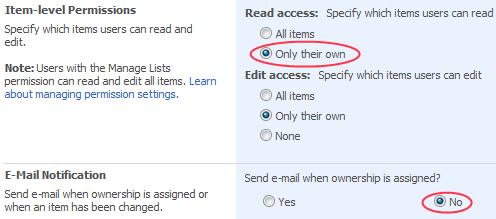
You can’t select both Read Access = Only their own and “Send email when ownership is assigned”
It appears that when you go back to Settings > Advanced Settings the Send Email when Ownership is assigned radio is set back to No when using Read Access = Only their own.
Why
Speculating here – I think that its because its very possible to set this up so the owner is not the assigned to person so you shouldn’t send an email to someone who shouldn’t be able to read it (and remember that when you re-assign a task an email goes out to both the old assignee and the new assignee) so rather than deal with these tricky scenario they just decided to disable it altogether.
Verified with
WSS3.0 12.0.0.6535 (SP2 + April 10th Cum Update)
References
Tags: Alerts, Troubleshooting
Posted in Troubleshooting Alerts | 1 Comment »


Hi,
When users have alert set up on a list for new items, how can we prevent alert mail being sent if the item has unique permissions and the user does not have access to that particular item?
Thanks.